From install to your first fix.
Tendlio shows you what needs work in your WooCommerce store and gives you the tools to act on it.
Works inside wp-admin · Reads your order history from day one · First results in minutes on most stores
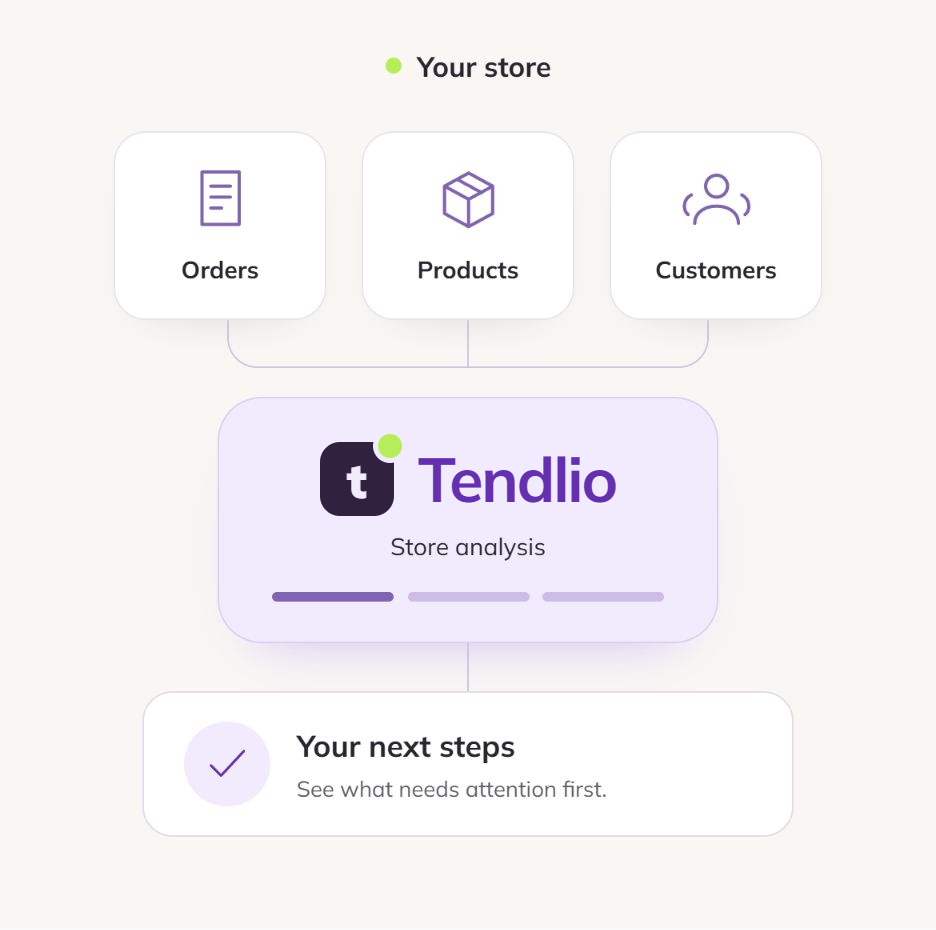
Analyze, score, rank, then fix.
After the first scan, Tendlio checks your store every week and updates your to-do list.
Analyze your store
Install Tendlio like any plugin, answer three questions, and the first scan starts on its own. It reads your orders, products, customers, stock, margins, coupons and reviews, so day one starts from your order history instead of an empty dashboard. If you haven’t entered cost prices, Tendlio estimates them from an average margin you give it during setup.
Two scores tell you where you stand
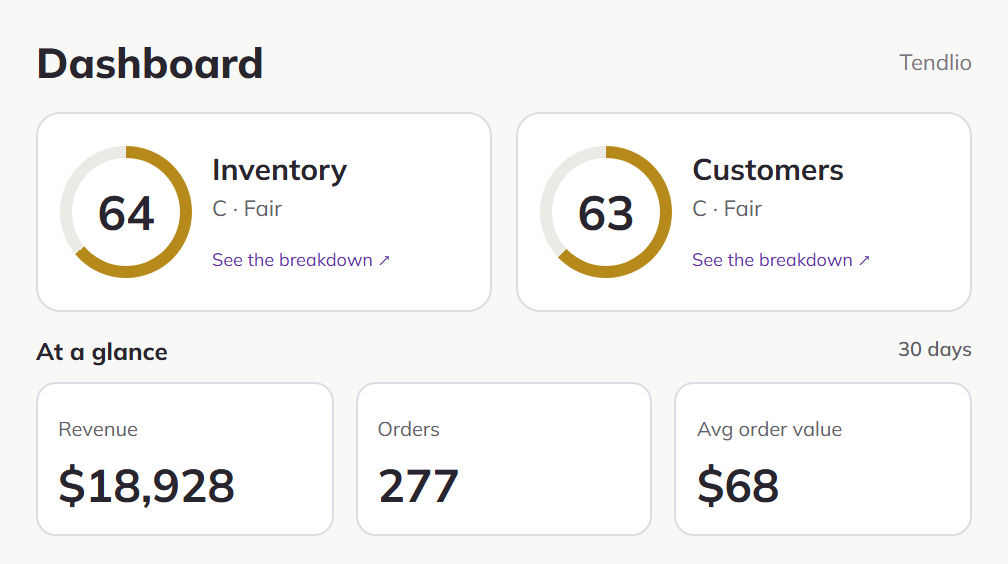
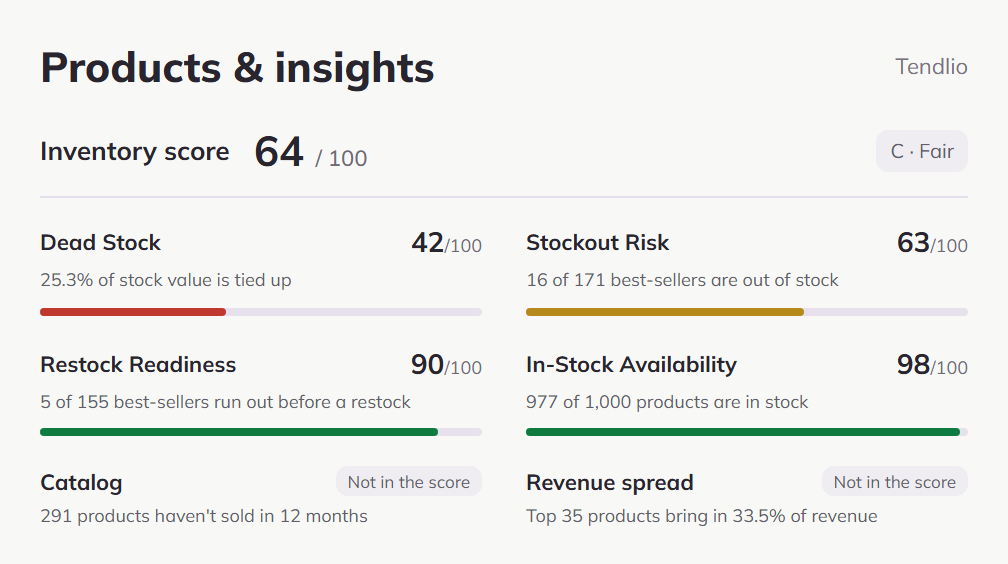
Your store gets two scores out of 100: one for your inventory, one for your customers. Each blends several signals, some counting more than others, into a single read on where that side of your store stands.
Click either score and it breaks down into its parts, with your own numbers next to each one.
A to-do list ranked by money
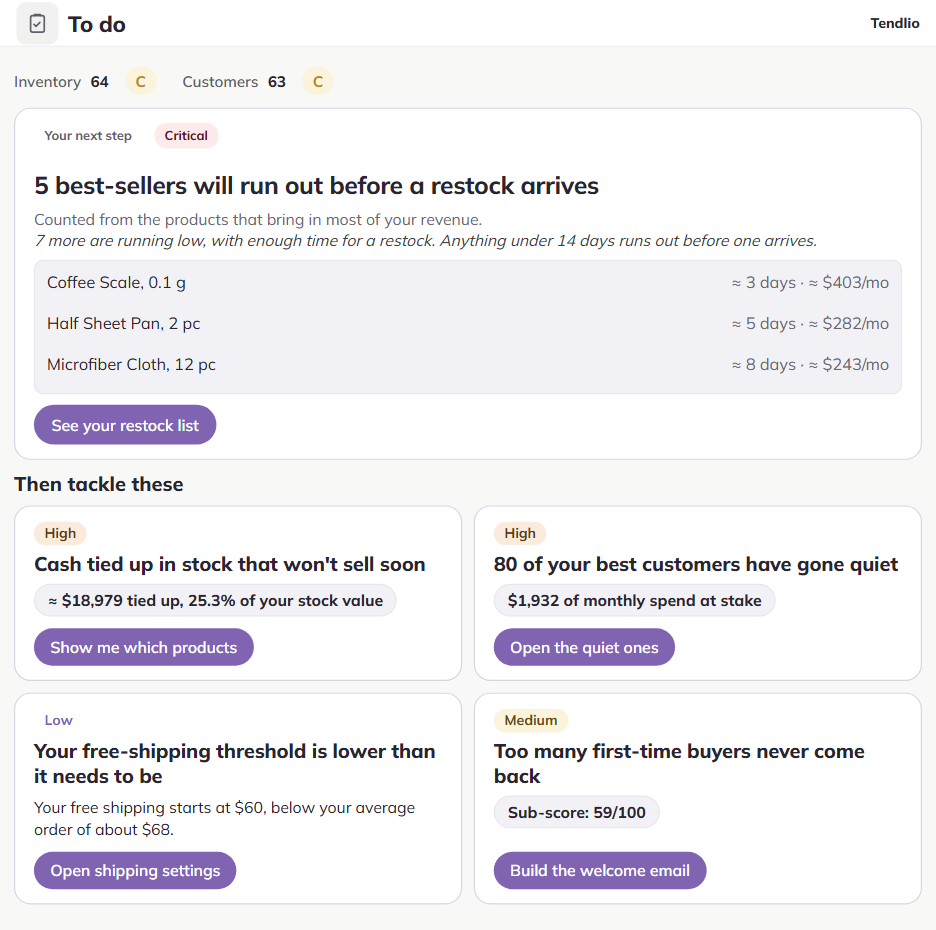
Everything the analysis finds becomes a card on one to-do list: urgent problems first, then the biggest amounts. Each card tells you what’s wrong, why it matters, how much money is involved where Tendlio can work it out, and what happens next. Some cards are a single switch. Others hand you a decision only you can make, with the numbers already worked out.
Fix a card and it moves to your done list, or dismiss one that doesn’t fit your store and it stays out of your way.
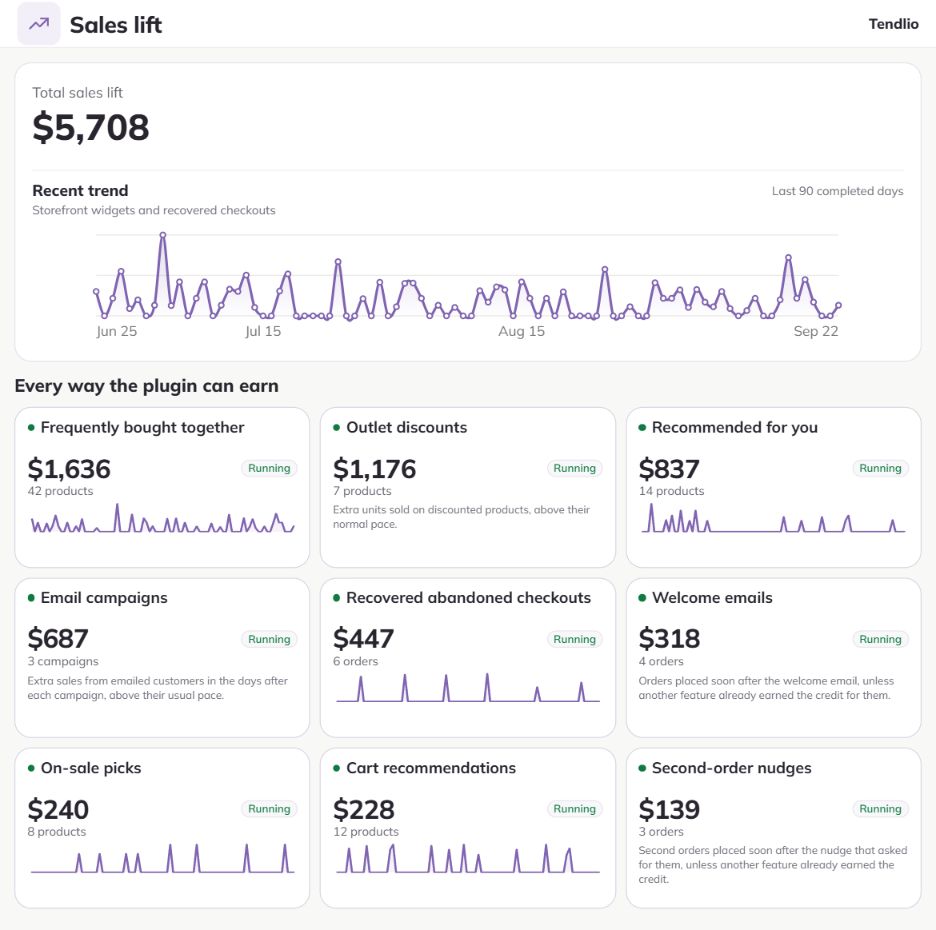
Tendlio does the work, then shows what it earned
Every fix ends in a built-in tool, not a link to documentation. Most of them run on their own once you turn them on: Tendlio sends the recovery emails, deepens your clearance markdowns on the schedule you set, asks for a review after delivery, and keeps the right products in front of shoppers.
Then Tendlio measures the effect from your own orders and adds it up on one page, with every amount showing how it was counted.
Every tool, and what it does for you.
Pick an area to see what it shows you and what it does.
A ranked list of what's costing you money
Two scores out of 100, one for your inventory and one for your customers, and under them a to-do list of everything the analysis found, urgent problems first, then the biggest amounts.
Open a score to see what’s pulling it down
Each score breaks into its parts, with your own numbers next to each one and how it has moved since your earlier analyses.
Every card says what to fix and why
What’s wrong, why it matters, how much money is involved where Tendlio can work it out, and a button into the tool that fixes it.
Work the list your way
Mark a card done and the next analysis checks it against your data. Mark it not relevant and it’s gone. Snooze it and it comes back later.
Your store's numbers, on one screen
A dashboard for the daily check, reports that each answer one question, and a summary in your inbox every week or every month.
Every number against the period before
Revenue, orders, average order value, gross profit, units sold and new customers for the last 7, 30 or 90 days, each with its change, and each card opens the report behind it.
Reports that answer one question each
Revenue over time, best sellers, biggest risers and fallers, categories, margins, revenue lost while products were out of stock, and whether your last discount or campaign paid off.
Profit after everything, and where orders come from
Net profit for the month after cost of goods, fees, shipping and ad spend, what a new customer costs you, and revenue by source from WooCommerce’s own order tracking.
Every product, with the numbers that decide what to do with it
One table for your whole catalog, sortable, filterable and exportable to CSV: how fast each product sells, what it earns a month, its margin, its stock, when it will run out, and a six-month forecast for any product you open.
The color tells you where to act
Green sells well for the stock you hold, red is dead stock. Sort by it and the products that need a decision come to the top.
See which products carry your revenue
An A, B or C class shows which products bring in most of your money, next to the margin each one earns and the cost behind it.
Earn more on what already sells
Tendlio finds best-sellers with a thin margin and proposes a small price increase; approve it, and it shows the profit before and after, so you keep the new price or put the old one back.
Know what runs out before it does
A 30-day forecast for every product that follows your seasons, and a restock list that says what to order, how much, and from whom.
Order before your supplier’s lead time runs out
Restock lists what runs out within 7, 14 or 30 days; anything that would run out before that supplier can deliver turns red.
The quantity is worked out for you
Each line suggests how much to order to cover the months you choose, minus what’s on the shelf, grouped by supplier with a purchase list you copy or email. Change any number you know better.
See early if the year is ahead or behind
The Forecast calendar sets predicted orders and revenue against what you’ve actually done, day by day, so a slow month shows early, not at the end.
Dead stock turns into cash on a schedule you set
Tendlio sorts your slow products into the ones to clear and the ones still worth saving, then discounts the dead ones for you in steps, or lets you pick and discount by hand.
Clear or revive, product by product
Dead means no sale in over a year and nothing coming: discount it. Slow but still selling, with margin left: try visibility or an email before you give margin away.
Discounts that grow until it sells
A small discount first, a bigger one after the days you set if it still hasn’t sold. Preview the whole plan before it touches a price, and undo any of it with one click.
See what the clearance earned
Units sold before and after each discount, the margin it cost you, and the result by category.
Winter stock isn't dead stock in July
Tendlio finds the products that sell in a season and treats them by that season, so you don’t clear them, reorder them or judge them at the wrong time of year.
Out of season, they’re left alone
No dead-stock color, no outlet discount, no restock reminder for a product whose season hasn’t come.
In season, shoppers see them first
Smart Product Sort lifts them up your category pages while they actually sell.
You settle the borderline ones
A pattern that hasn’t repeated across two years lands on a needs-review list; mark the product seasonal yourself and your call always wins.
Know who's worth what, and who's slipping away
Every customer lands in a plain-English segment, and one list shows what each of them has spent, how often they order and when they last did.
Seven segments you can act on
Champions, Loyal, Promising, New, At-Risk, Hibernating and One-time, each with its size and revenue, what to do about it, and a button to email it.
Views that find the customers you’d miss
Top spenders, the ones going quiet, discount-led buyers who only order with a coupon, and refund-heavy buyers.
Cohorts and the products that bring good customers
Customers grouped by the month they first bought and followed for twelve months, and the first purchases that turn into your most valuable regulars.
Checkouts that almost happened come back
When a shopper types their email at checkout and never finishes, Tendlio keeps the cart and sends a reminder first, and an offer picked from what was in it only if they still haven’t ordered. Already sending cart reminders from another email tool? Tendlio tells you to leave its own reminder off, and the rest of Tendlio works alongside that tool.
The right offer for that cart
Free shipping if they were paying for it, a discount if shipping was already free. Coupons are single-use and expire.
Timed past the people who’d return anyway
Tendlio measures how long shoppers in your store take to come back on their own and times the offer to land after them, so it goes only to the ones who still haven’t ordered. You decide when the reminder goes out.
Numbers you can trust
Shoppers who finish the order before any reminder goes out are counted as coming back on their own, and the revenue Tendlio claims is from checkouts its email brought back.
The second order is the hardest, so it gets its own email
A welcome email a few days after a customer’s first order, and a nudge later if the second order hasn’t come, each on the timing you set.
Welcome them while they still remember you
Sent the number of days after the first order you choose, editable with a live preview and a test send to yourself. You don’t start from a blank page: a written starter opens in the editor, for you to change.
Nudge only the ones who didn’t come back
If the second order is already in, the nudge is skipped, and it never lands within days of another Tendlio email.
See what each one brought back
Second orders placed after the nudge show on Sales lift, counted once.
Write once, send to a segment, judge it by orders
A block editor with your products in it, ready-made emails, and campaigns that go to one segment and report the orders that followed.
Build the email from blocks
Headings, text, buttons, images, columns and live product cards from your catalog, in several designs with your brand colors, previewed for desktop and phone.
Start from an email that’s already written
Ready-made starters, from a welcome to a win-back to a VIP thank-you, plus a prompt for each segment you can paste into ChatGPT or Claude and paste the result back.
Send to the right people and read the result
Pick a segment, send at a safe pace, then see the orders that followed next to every past campaign, with opens and clicks when you send through Brevo.
Reviews from every buyer, and a direct line to you
A few days after an order is completed, the buyer gets a short “how did it go?” email, and your best customers get recognized when they shop.
Every buyer is asked the same way
After any rating, the page offers a review on your product page and a box to write to you privately, and you answer from your own inbox.
Reviews go where they’re missing
When an order had several products, the request points to the one with the fewest reviews.
Your regulars get a thank-you when they shop
Champions and Loyal customers see it on your store when a coupon is due for them, spaced by orders and time, and their orders are flagged in your admin.
Turn more visitors into customers
Product rows built from what your customers actually buy together, on the product page, in the cart and on your homepage, a Deals page that updates itself, and a category order ranked by profit.
Recommendations from real orders
Frequently bought together on the product page, picks in the cart, a personal row on the homepage, and in-stock alternatives on a sold-out product.
Categories sorted by what earns
Smart Product Sort ranks your listings by profit per day, gives new products a fair start and sends out-of-stock ones to the end.
A report for every widget
Views, clicks, add-to-carts, purchases and revenue for each row and each product in it, so you keep the ones that pay.
What each feature earned, from your own orders
One page that adds up the sales Tendlio can trace to its own work, with every amount showing how it was counted.
One order, counted once
Recovered checkouts, repeat sales from won-back customers, campaigns, welcome and second-order emails and storefront widgets never credit the same order twice. Outlet’s figure is an estimate from the extra units sold after each discount, so a sale it counts can also count for another tool.
Every line opens the feature behind it
See what recovered checkouts earned this month or what the outlet cleared, and go straight to that tool.
Did the last move pay off?
After a discount, a campaign or a review push, the “Did it work?” report reads your sales and tells you whether the numbers moved.
Run the tools that fit your store.
Choose which emails to send, which products to discount and which recommendations shoppers see.
One switch per automation. Recovery emails, welcome and second-order emails, review requests, outlet markdowns and each recommendation row on your store turn on separately.
See it before it goes out. Every email has a live preview and a test send; the outlet shows its full plan before it changes a price.
Your own email account. Emails go out the way your store already sends email, or through your Brevo or Amazon SES account, under your name, with no per-email charge from Tendlio.
Light on your store. Tendlio’s analysis runs in the background, in small steps that stay within shared hosting limits, so shoppers don’t wait for it.
One click back. Outlet markdowns and best-seller price tests return to the price you had, schedule included.
How much is your store losing right now?
Early access is open now. Sign up to ask for one of the 20 early access places, or to hear when the free trial opens at launch. Early access stores that buy a plan keep 50% off for life.