You send a customer's first order, then hear nothing from that customer again. Your store may have a long list of people who bought once, even though you paid for ads or spent time getting your products found. If you're wondering how to get customers to order again, start with what happens after that first purchase.
Send a welcome email, then one follow-up that gives the customer a clear reason to place a second order. Time that follow-up around the product they bought, and skip anyone who has already ordered again. The customer still remembers the first purchase, so you can explain what to buy next and why that product would be useful.
This guide explains when to send that follow-up, what to say, and how to check whether more first-time buyers are coming back.
Why the second order matters
- You already paid to get this customer. The ad click or the work that helped the customer find you was a cost of getting the first order. If the customer returns without another acquisition cost, an order of the same size leaves you more profit, provided you haven't given that profit away through a discount.
- You have more information for future emails. A customer who has ordered twice has chosen your store twice. Those purchases give you more information for later recommendations and emails asking the customer to return. With only the first order, you have less to go on.
- Customers who never place a second order remain one-time buyers. Use our repeat purchase rate guide to count how many customers bought once and never again. That count tells you how many first purchases haven't led to another order. Our one-time customers guide explains what to do with customers who are already in that group.
Choose the timing from the product
A useful follow-up arrives when the customer has a reason to buy again. For a consumable, that may be when the supply is running low. For a product with accessories, the first few days may be the time to suggest something that goes with the purchase. A durable product may not need replacing, so ask for a review, offer care advice, or write about the next occasion when the customer might buy.
The same schedule won't suit every product. Seven days after purchase is early for a 90-day supply. But seven days may be late for an accessory the customer would have wanted in the first few days. Set the delay according to how the customer uses the product. If you sell across categories, either choose one delay that is a compromise or send different follow-ups according to what the customer bought.
How to get customers to order again: what to do
- Send the welcome email first. Explain what you stock, how to reorder, and what makes your emails worth staying subscribed to. Keep the selling gentle in this email, because its first job is to explain what the customer can expect from your store.
- Send one follow-up asking for the second order. Mention what the customer bought, suggest the product that makes sense to buy next, and include a link that takes the customer straight to that product. To choose the suggestion, look at what other customers who bought the same item added in later orders.
- Skip customers who have already ordered again. Before sending the follow-up, check whether the customer has placed another order. Asking someone to place a second order when they're already on their third makes the message feel careless. Whatever sends the email must make that check.
- Be careful with a discount. A small incentive can help a customer decide to buy. A 20% code can also bring a profitable second order, but think about what that code tells someone who first bought a month ago. That customer may learn to wait for your prices to come down. When the suggested product is useful and the timing is right, the email already gives the customer a reason to order. If you want to offer an incentive, free shipping gives the customer something without lowering the product's price.
- Measure customers by the month of their first order. Group the customers who first ordered in the same month. Then count the share who ordered again within a fixed period, such as their first 90 days. You're trying to increase that share with the welcome email and follow-up. To check a change you've made, start with customers whose first orders came after the change. Wait until those customers have had the full period to return before comparing them with customers from earlier months. Our repeat purchase rate guide explains the method, and our cohort analysis guide explains how to compare these monthly groups in more detail.
What if customers don't need to buy the product again?
Some products are things people buy once. You can still follow up, but asking for another of the same product may make no sense.
Ask for a review while the customer still remembers the purchase clearly. Then wait for a reason they might need your store again, such as a gift, an event, or an upgrade. Write the next email about that occasion so the customer can see why you're contacting them. A general newsletter doesn't give the same specific reason to return.
How Tendlio helps you follow up
Tendlio is a WooCommerce plugin that does these checks for you. Doing this by hand means finding first-time buyers, deciding when to contact them, checking for another order before each email, and counting who returns. Tendlio helps you do that work in WooCommerce, so you can spend your time choosing a useful suggestion and writing the message.
Find the customers who need a reason to return
Start on the Customer segments page. The New segment shows recent first-time buyers who haven't returned, so you can see which customers still need a reason to buy again, and you can use the same filter on the Customer list. Our segment actions guide explains what to do with the other customer groups.
A welcome and one nudge, timed from your own customers
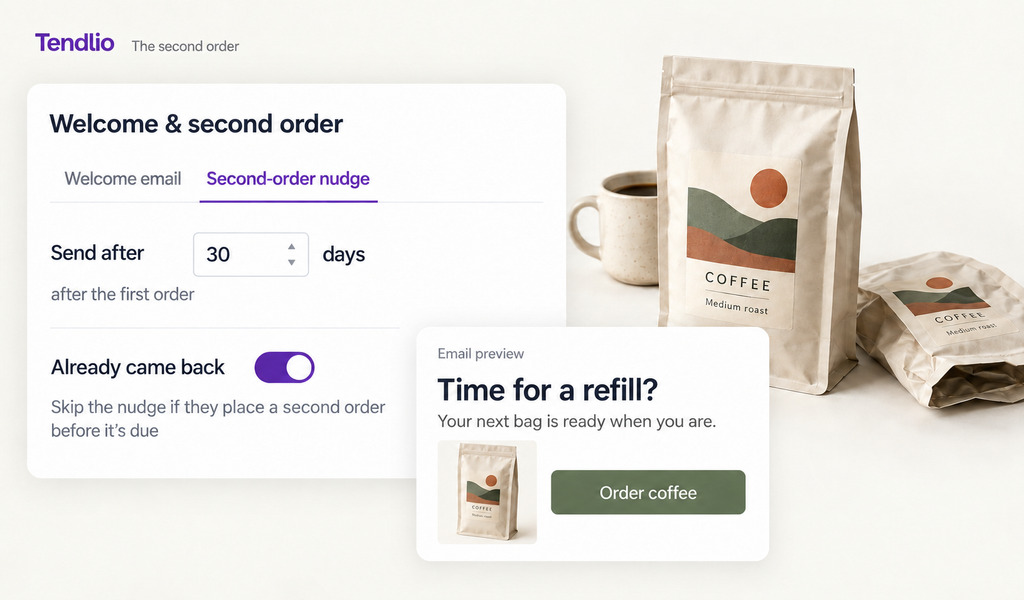
- Two separate emails. On the Welcome & second order page, you can prepare a welcome email and a separate second-order nudge. Keeping the emails separate lets the welcome explain your store before the nudge asks for another order.
- Timing from your own store. Once your store has enough repeat buyers, Tendlio measures how long they took to place their second order and suggests sending the nudge a little earlier, so your own customers' purchase history helps choose the timing.
- No nudge after a second order. Tendlio checks whether a customer has already returned before sending the nudge, so you don't ask for a second order after the customer has placed one. The automated emails keep a gap between them, too, so customers don't receive two in a row.
The message and the products in it
- A ready-made email. Choose one that asks how the first order went or one written for the next occasion. The accompanying prompt for Claude or ChatGPT asks for no percentage discount and suggests free shipping if an incentive is needed, which follows this guide's advice to give customers a reason to return without teaching them to wait for a lower product price.
- A review request for products people buy once. Tendlio can email each customer a set number of days after the order is completed and ask how the purchase went, so the request arrives while the customer still remembers the purchase, as this guide suggests.
- A row of product suggestions. Tendlio builds that row from products bought together in the same order, so the row shows what goes together. What customers added in a later order, which step 2 suggests looking at, isn't part of the row. The Customers report shows those later purchases under What customers tend to buy next, so you can add the product customers come back for to the email yourself.
- A test email first. Send a test email to yourself before sending to customers, so you can check the wording and product row first.
See who came back
To review the results, the Customers report groups customers by the month of their first order and shows the share who bought again within their first 12 months. That period is longer than the 90 days in step 5, so read it as the same measure over a longer stretch. The Sales lift page also counts second orders placed soon after a nudge. Together, these views help you review which customers returned and which orders followed a reminder.
Want every new first order followed by a welcome and one nudge, timed from how long your own customers take to come back? Start your free trial of Tendlio.
FAQ
How soon after the first order should I follow up?
Choose the timing from the product: near the point when a consumable runs low, or in the first week or two for an accessory. If you have enough repeat buyers, measure how long they took to return and send the follow-up a little before that.
Should the second-order email include a discount?
Start without one, because a useful suggestion at the right time already gives the customer a reason to order. If you offer an incentive, keep it small and one-time. An order placed with 20% off may still be profitable, but that order doesn't tell you whether the customer would return at full price.
What's the difference between the welcome email and the second-order nudge?
The welcome email arrives a few days after the first purchase and explains what the customer can expect from your store. The second-order nudge comes later, timed to how the product is used, and asks for another order.
What should the follow-up say?
Mention what the customer bought, suggest one useful next purchase, such as a refill, a matching item or a product other buyers added, and give one clear link to it. Keep the email short, so the one suggestion is what the customer reads.
Does this work for stores where people buy once a year?
Yes. Ask for a review while the customer still remembers the purchase, then time the next email around the next season, event or anniversary of the purchase. Don't send weekly emails without a reason.