
You check a product's stock and wonder whether to order more now or wait. If you wait too long, the product could sell out before the next delivery. If you order too soon, you spend money on stock you don't need yet. The reorder point formula gives you a stock level to check, so you don't have to decide by looking at the shelf.
The reorder point formula is daily sales multiplied by your supplier's lead time, plus safety stock. The result is the number of units you should have left when you place an order. When stock falls to that number, order more.
How much to buy is a separate question. Order enough to last until you'd realistically place the next order with that supplier.
The reorder point formula
Reorder point = (daily sales × lead time in days) + safety stock
You keep selling while you wait for a delivery. You therefore need enough stock to cover those sales, plus some extra units in case the delivery is late or sales are higher than usual. To calculate that stock level, you need your daily sales, your supplier's lead time, and your safety stock.
Step 1: calculate your daily sales
Take the units sold over a recent period and divide by the number of days the product was in stock during that period. Count the orders you shipped, and leave out canceled and refunded orders.
Use days in stock because a sold-out product can't sell. If the product was sold out for two of the last twelve weeks, including those two weeks would make daily sales look lower than they were while customers could buy it. Our sales velocity guide explains this calculation in detail.
Use a shorter period for reordering than you would for a yearly review. Start with 90 days. That period is recent enough to reflect what's selling now, but long enough that one busy weekend doesn't determine the result.
For example, if a product sold 60 units in the last 90 days and was in stock throughout, daily sales are 0.67 units. Keep the decimals. Rounding 0.67 up to one unit a day would increase every calculation based on that number by about half. In the example below, you'd get a reorder point of 21 units instead of 14.
Step 2: measure your supplier's lead time
Lead time is the number of days from placing an order to having the stock ready to sell. Use the dates from your own orders, rather than the shipping estimate in the supplier's catalog.
Look at your last few orders with each supplier. For each order, write down the date you placed it and the date customers could buy the delivered products. Count the days between those dates. This includes time waiting for the supplier to dispatch the order, time in customs, and time you spend receiving and labeling the products.
Track lead time separately for each supplier because your fastest and slowest suppliers can differ by weeks. Record the usual lead time and the longest you've waited. You'll use the difference to calculate extra stock for late deliveries in the next step. Our supplier lead times guide explains how to measure and track both.
Plan separately for any weeks when the supplier closes for holidays. If you place an order on the day the factory closes, the order will wait until the factory reopens. Include that wait in your plan.
Step 3: calculate safety stock
Safety stock is the extra stock you hold for a late delivery or higher sales than usual. The standard calculation uses statistics called standard deviations and service levels. For a small store deciding when to email a supplier, use this simpler calculation:
Safety stock = daily sales × how late your late deliveries run, in days
If your supplier normally takes 14 days but has taken 21, the delay you need to allow for is 7 days. At 0.67 units a day, that's about 5 extra units.
Also allow for weeks when sales are higher than usual. If the product sells about double its daily average during a good week, hold enough extra units to cover a week at that double rate.
Holding safety stock means paying for a few extra units before you need them. Without those units, a late delivery could leave you unable to sell the product until the order arrives.
A worked example, from daily sales to reorder point
Suppose a product sells 60 units per 90 days, or 0.67 units a day. Your supplier's measured lead time is 14 days, and you want enough safety stock for a 7-day delay.
- Expected sales while you wait: 0.67 × 14 = about 9 units
- Safety stock for a delay: 0.67 × 7 = about 5 units
- Reorder point: 14 units
When stock reaches 14 units, order more. Do this even if the shelf doesn't look empty or the month seems quiet.
How much to order
Your reorder point tells you when to buy. To decide how much to buy, calculate how many units you expect to sell before you'd realistically place another order with that supplier.
Order quantity = daily sales × days until you'd realistically order again
If you order from this supplier about once a month, multiply 0.67 by 30. That gives an order of about 20 units.
Here's what happens after you place that order. You have 14 units left and order 20. During the 14-day wait, you sell about 9 units, leaving 5. When the 20 units arrive, you have 25 units in stock. About 16 days later, stock reaches 14 again. It's now about a month since your last order, so you order again. Unless the delivery was late, you haven't needed the 5 units of safety stock.
Your supplier's minimum order quantity may change how much you buy. For example, you might need 20 units but have to order 50. Before agreeing, calculate how long those units will last. You might decide, "I'm buying 10 weeks of stock to meet the minimum." Make that decision deliberately, because buying extra without checking can leave you paying for stock you won't need for a long time. Our minimum order quantity guide explains how to judge whether the extra units are worth buying.
Available cash also affects the order. When cash is tight, restock your fastest sellers first and buy less of the slow sellers. Before reordering a slow product, check whether you should keep stocking it at all. Our guide to what to do with dead stock explains how to make that decision.
When recent sales give you the wrong reorder point
The formula assumes that future sales will be similar to recent sales. Adjust your approach in these four situations:
- Seasonal products. A 90-day average from the off-season can suggest very little demand, even when the busy season is about to begin. That average can stay too low for months after demand increases. Plan your seasonal order around the expected peak. Our guide to seasonal reorder points explains how.
- New products. With only a few weeks of sales history, your daily average can change every week. Treat the result as an estimate, check it regularly, and expect to adjust it.
- Products with rapidly growing sales. If sales double month over month, the average for the whole period will be too low for the coming weeks. When recent weeks clearly show higher daily sales, use those weeks to calculate your reorder point.
- Planned promotions. A sale or a featured product placement is intended to increase demand. Base the order on the promotion you plan as well as on past sales.
A weekly reorder routine
Once you've calculated a reorder point for each product, follow these steps:
- Once a week, list products at or below their reorder point. Add sold-out products that were selling before they ran out.
- Put best sellers first, because running out of those products would cost you the most sales.
- Group products by supplier so you can send each supplier one complete order.
- Calculate quantities from how long each order should last. Adjust for minimum orders and available cash, then send the orders.
This takes about twenty minutes most weeks. You also need to update the reorder points when daily sales or supplier lead times change. Otherwise, you'll be ordering from numbers that no longer describe your store.
How Tendlio helps you prepare the order
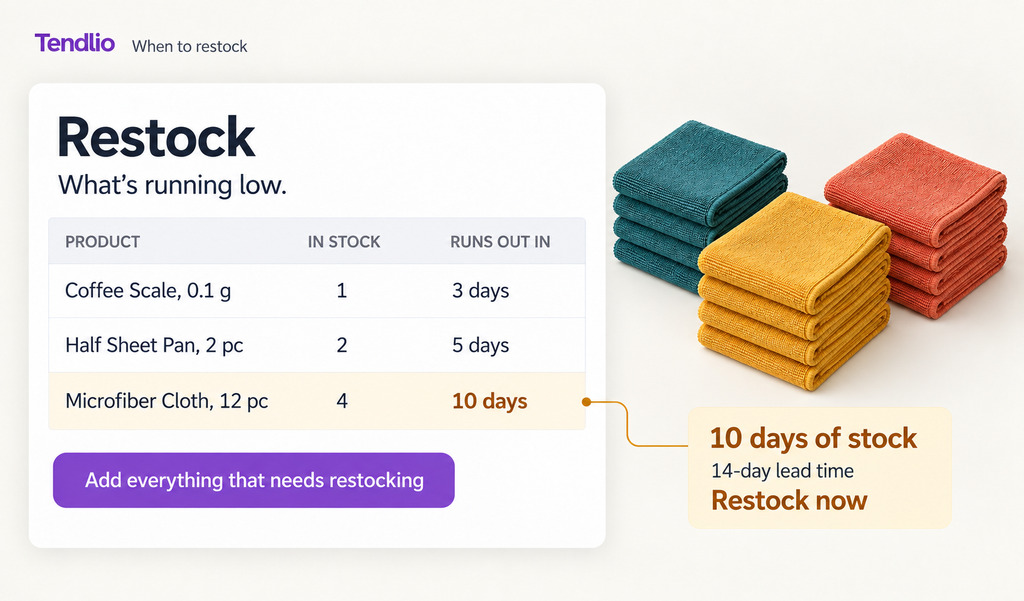
Tendlio is a WooCommerce plugin that does these checks for you. Doing this by hand means checking sales, updating calculations, finding products that need stock, and assembling a separate order for each supplier. Even after you've calculated every reorder point, you need to keep those numbers current as sales and delivery times change. Tendlio brings those checks together on the Restock page so you can use them to prepare your supplier orders.
A forecast that follows the season
For the first step, Tendlio reads your orders and forecasts demand from each product's own sales history. Tendlio uses sales from the same weeks in previous years, giving more weight to the more recent year, which matters for the seasonal products discussed above. The forecast for a seasonal product can rise as the busy season approaches, instead of relying only on the low sales recorded during the off-season.
On each product's Insights page, the 6 mo panel covers the next six months and highlights the months when the product sold more last year, which helps you plan the main seasonal order.
Days left, against your supplier's lead time
Tendlio then uses the forecast and the stock recorded at the latest analysis to show how many days each product has left before it sells out. Tendlio compares those days with the supplier's lead time. This answers the same question as the reorder point calculation: will the stock last until another delivery can arrive?
The Order within column on the Restock page gives the answer in days: the days of stock left, minus the supplier's delivery time. Once you've told Tendlio how long your suppliers take to deliver, your To do list also names the best-sellers you need to order within the next week to stay in stock.
The weekly order, ready to send
- One click builds the list. Click "Add everything that needs restocking." Tendlio adds products that have sold out and were selling, along with products expected to run out soon. Sold-out products come first, with those losing the most sales at the top. Off-season products stay out of the automatic list, helping you avoid buying stock right when demand falls.
- Suggested quantities that you can change. You choose how many months each order should cover, and each product comes with a suggested quantity for that period, based on sales, forecast demand, and the stock you already have. You can enter your own quantity after checking your budget and supplier requirements. The quantities you type stay as you entered them, so the suggestion doesn't replace your decision.
- One order per supplier. With suppliers assigned, Tendlio groups the products into supplier orders. If a supplier sells in packs, the quantities round up to whole packs. If you've entered a supplier's minimum order, the group adds up the order at your cost prices and says how much is missing when the order falls short. You can then copy each order into an email to that supplier.
The weekly routine ends with an order you can send, without having to assemble the same information again.
Want your restock list built from your own sales, grouped by supplier, with the quantities already filled in? Start your free trial of Tendlio.
FAQ
What is the standard reorder point formula?
Reorder point = (average daily sales × lead time in days) + safety stock. Daily sales come from a recent period, counted over the days the product was in stock, and safety stock covers late deliveries and busy weeks. When stock reaches the calculated reorder point, order more.
How do I calculate safety stock without statistics?
Multiply daily sales by the number of days your supplier's late deliveries have been delayed. If an order sometimes arrives a week late, hold enough extra stock for a week of sales. The result is less precise than the statistical method, but it's precise enough for a small store deciding when to email a supplier.
What if my supplier's lead time varies a lot?
Use the usual delivery time as your lead time, then calculate safety stock from the difference between the usual time and the longest you've waited. For an unpredictable supplier, record the lead time of every order for a while. The records can help you discuss delays with the supplier or decide whether you need a second supplier.
What's the difference between the reorder point and the order quantity?
The reorder point tells you the stock level at which to place an order. The order quantity tells you how many units to buy, from how long you want the order to last, supplier minimums and available cash.
How does this work for seasonal products?
An off-season sales average can give you a reorder point that's too low when the busy season starts. Plan your main seasonal order around the expected peak, using last year's season as a guide. Then use reorder points during the season, when recent sales reflect the demand you're trying to cover.