
You've got products that sold a few units when they arrived and then stopped selling. You keep seeing those products on the shelf, but deciding what to do with dead stock takes time. A discount means making less on each sale, and leaving the price alone hasn't brought in orders. Meanwhile, the money you paid for those products is still unavailable for your next purchase.
Here's what to do with dead stock: first check whether the product deserves more time to sell. If the product does, show it to more shoppers, then try bundling it with something that sells. If those attempts fail, discount the product in steps. If discounts don't work either, use the product as a gift, sell the stock in bulk, or donate the stock and write it off. Finally, stop reordering the products that caused the problem.
These are the five moves below. The first four start with the option that keeps the most profit from each sale. A few questions will tell you where to begin.
This guide assumes you've already identified the products that aren't selling. If you haven't, our sales velocity guide explains how to rank products by how quickly each one sells. Our guide to how much inventory to hold explains what it costs to keep stock you aren't selling.
Four questions that decide what to do with dead stock
- Has the product sold at all in the last two months? Even one sale counts.
- Does the product keep a good margin? If a third of the price or more is profit, it's worth making more effort to sell it at that price than it would be for a product with very little profit per sale.
- Is the product less than a year old? If you haven't stocked the product through every month of the year, you don't yet know whether it sells better in a particular season.
- Is the product seasonal, with the peak still ahead? No sales outside its season doesn't mean there will be no demand when the season arrives.
If you answer yes to any question, you can probably get the product selling again. Start at move 1, and go to the next move only if the previous one fails.
If all four answers are no and the product hasn't sold in a year, go straight to move 3. An older product with little profit per sale, no coming season, and no sales for a year is unlikely to sell only because you move it higher on the page.
If all four answers are no but it's been less than a year since the last sale, try moves 1 and 2 first. Start by showing the product to more shoppers, which doesn't require cutting its price.
Move 1: show it to more shoppers
A product may not be selling because shoppers aren't seeing it. A product could spend a year on the third page of a category without being seen by someone who would buy it. Before lowering the price, check how many times shoppers opened the product's page in the last month or two. If your store uses an analytics tool, the tool counts the visits to each page.
If few shoppers opened the product's page, put the product where shoppers are more likely to look: at the top of its category, in a featured position, or beside a related best-seller as a recommendation. If many shoppers opened the product's page and nobody bought the product, the product's position isn't the problem, so go to move 2.
Send an email about the product to customers who bought something similar. Those purchases give you a reason to think the customers could be interested. A banner shown to everyone in the store doesn't make that distinction.
Give the new placement a few weeks. If shoppers have had that time to see the product and it still hasn't sold, the product's position wasn't the problem.
Move 2: bundle it with a product that sells
Offer the slow product together with a best-seller at a small discount on their combined price. Shoppers who want the best-seller then have a reason to buy the slow product too.
Take most of the discount out of the slow product's margin and as little as possible out of the best-seller's. You're trying to sell stock that might otherwise need a discount anyway, so protect the profit on the product that already sells.
Choose products that a shopper would use together, such as an accessory and its device, a refill and a starter kit, or a candle and a holder. Boots and a phone case don't give the shopper a useful reason to buy both. Our product bundling guide explains how to price the pair and present the offer.
Move 3: discount it in steps
When you've decided to reduce the price, start with a small discount and increase it on a schedule. For example, offer 10% off after 60 days without a sale, 20% after another 45 days, and 30% after 45 more.
You don't know in advance what price will persuade someone to buy, or whether a lower price will work at all. Increasing the discount in steps lets you try a smaller reduction first. A product that sells at 10% off then doesn't need to be offered at 30% off from the start.
Never raise the price back. A shopper who saw the lower price and returns to find a higher one has a reason to distrust your sale prices.
Keep clearance products together in a labeled outlet or sale section. That helps shoppers understand which products you're clearing, instead of expecting every product to be discounted. Our clearance sale guide explains how to run that section.
Check what you paid for the product. An initial 10% discount only puts the price below cost if the margin was under 10% to begin with. The second or third discount could put the price below cost, so look up the cost before the second step.
You can deliberately sell below cost if getting some cash back and freeing the shelf space are worth more than waiting for a more profitable sale. Make that decision yourself rather than discovering afterward that the price was too low. Our guide to selling below cost without noticing explains how that mistake happens.
Move 4: recover value another way
If the discounts haven't produced sales, offer the product as a free gift when a shopper spends above a minimum cart total. You're giving away something you were about to write off, while giving the shopper a reason to add an item to reach the minimum.
Another option is to sell all the remaining units to a bulk buyer for a fraction of the retail price. Getting that money back can be better than paying for another year of storage. Or donate the products and write them off. Storage costs money every month, and eventually the empty shelf space can be worth more than waiting for a sale that may never happen.
For all four moves, use the same rule: when a move fails, take the next one until you've recovered cash or freed the space. Don't leave an unnoticed small discount on the product for a year, then another, without deciding what happens next.
Move 5: stop buying it
Before you reorder a product that needed move 3, spend a minute asking why it didn't sell. Did you buy it because you expected demand that never arrived? Did a trend end? Was one size or color left over while the others sold?
Use the answer when you prepare your next order. If you clear a product and then buy it again for the same reason, you can end up with the same unsold stock next year.
Our reorder point guide explains when to order more stock. Our guide to seasonal inventory management explains how to buy for a sales peak without keeping a year's worth of stock.
How Tendlio helps you decide what to try next
Tendlio is a WooCommerce plugin that does these checks for you. Doing this by hand means checking each product's sales, age, season, and margin before deciding what to do. You then need to make sure shoppers see the product, track discounts, and remember when to try something else. Tendlio helps you choose the products to work on and carry out the next steps, then shows which discounted products still haven't sold.
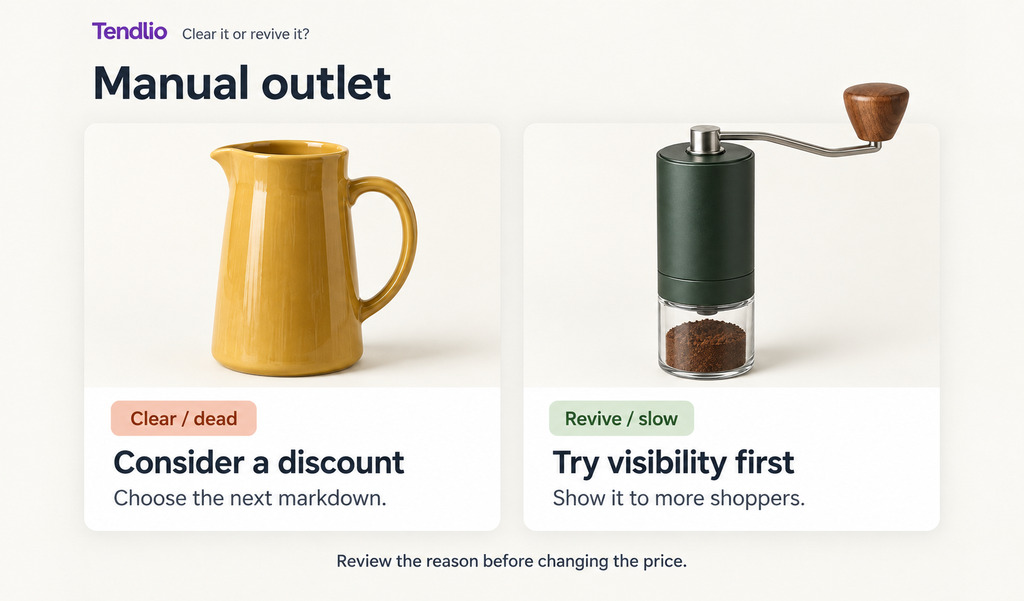
Clear or revive, product by product
Tendlio answers the four questions for you. The Manual outlet page's Dead or slow list puts the products with the biggest stock value first. Each product is marked Clear / dead or Revive / slow, with a reason beside the mark. Tendlio uses sales history, seasonality, age, margin, and expected demand to distinguish products worth trying to sell again from products to clear. Revenue groups also help identify clearance candidates. Our guide to ABC analysis explains those groups.
While a season is running, the Unsold last season list on the Manual outlet page shows the seasonal products that sold nothing in their last season, so you can discount them while shoppers are buying.
Tools for the moves in this guide
- Move 1, show it to more shoppers: views and Boost. For a product worth reviving, the first question is whether shoppers have seen it. Each product's Insights page in Tendlio answers that question: how often shoppers saw the product in a list, and how often they opened its page in your shop. Boost, on the same Insights page, moves the product higher on shop and category pages and in recommendation rows it already belongs to.
- Move 1, the result: before and during the boost. Once a boost has run a full week, the Insights page compares the boost with the same number of days before the boost: how often shoppers saw the product and opened its page, and how many units sold. The comparison shows the two things move 1 asks you to check: whether shoppers saw the product during the boost, and whether the product sold. If a slow product sold nothing and the count shows that only a few shoppers saw it during the boost, Tendlio suggests another boost before a discount, and says how many times shoppers saw the product or opened its page.
- Move 1, the email: Campaigns. A campaign can send one of your saved emails to everyone who bought from the product's category, so the email reaches customers who bought something similar.
- Move 3, discount it in steps: Manual outlet and Auto outlet. When discounting is the right next step, Manual outlet lets you apply a chosen percentage to a product, and Auto outlet runs scheduled discount steps for you. A new store starts with this guide's example: 10% after 60 days without a sale, then 20% and 30%, 45 days apart. While the product remains in the outlet, the discount only increases, following the guide's rule that shoppers shouldn't return to a higher clearance price.
- Move 3, the outlet section: the Outlet tag. Tendlio tags every product it discounts, so you can build an Outlet page in your shop from that tag and keep clearance products together, as move 3 suggests.
- Move 4, recover value another way: the Results tab and Free gift. The Auto outlet Results tab compares units sold after its discounts with units sold over an equally long period before them. Its section called "Not moving, even at a discount" lists the discounted products that still haven't sold, so you know when to take move 4. The Free gift feature lets shoppers claim an eligible product after reaching a minimum cart total.
- Move 5, stop buying it: a to-do card. A to-do card identifies products that still sell but already have many months of stock, so you can stop further orders while you sell what you have.
Where Auto outlet holds back
- Products to check before any discount. Auto outlet leaves alone a product that is out of season, too new to judge, expected to sell soon, or already on a sale you set yourself. Leaving those products alone is the check this guide asks you to make before any discount.
- Products shoppers haven't seen. Where Tendlio can measure views, Auto outlet holds a product at its first discount step until shoppers have seen it, and the Auto outlet plan offers Boost beside the product. If shoppers haven't seen the product, Auto outlet doesn't increase the discount only because there are no sales.
Start in Preview to see the plan before any prices change.
Want your slow stock split into clear and revive, and the markdown steps run for you? Start your free trial of Tendlio.
FAQ
How big should the first markdown be?
Start small, around 10%, and increase the discount on a schedule if the product doesn't sell. A small first step shows whether a small reduction is enough. Going straight to half price can clear stock quickly, but you may give up more profit than you needed to.
How long should I wait between markdown steps?
Wait until a reasonable number of shoppers have seen the current price, which can take a few weeks to a couple of months, depending on your traffic. If you're changing prices by hand and a discount has produced no sales at all, you can move to the next step sooner.
Is it ever right to sell below cost?
Yes, if you decide that getting cash back, freeing shelf space, or avoiding storage costs is worth more than the profit you still hope to make. The mistake is selling below cost unintentionally because several discounts were combined and nobody checked the final price.
Won't constant discounting damage my brand?
Discounting the whole store all the time can teach shoppers to wait for the next sale. Keep clearance products in a labeled outlet or sale section so shoppers can distinguish them from the rest of the store. Keep your best-sellers at full price, and clear seasonal leftovers at the end of the season.
What about seasonal products that aren't selling right now?
No sales outside a product's season doesn't necessarily mean the product has no buyers. Leave those products alone, and keep them out of the discount steps until their season starts. Judge each product by how it sells during its own peak months.