
You might have a coupon that still gets used every week, such as 10% off for newsletter signups or a code from last year's sale. The redemption count looks good, so you leave the code running. But when you try to measure coupon effectiveness, that count doesn't tell you whether the discount is helping you make money.
To measure coupon effectiveness, answer three questions: how much margin did the discount cost, did the coupon bring in orders you wouldn't otherwise have received, and who used the code? Those answers help you decide which coupons to keep and which to stop. Without them, a popular coupon can keep reducing your profit while its redemption count makes it look successful.
What WooCommerce tells you about your coupons
WooCommerce's built-in analytics show orders per coupon and the total amount discounted. You can see which codes people use and how much those codes take off the prices you charge.
But those numbers don't tell you whether the coupon brought in extra orders, how much margin you lost, or whether the people using the code were new customers or regular customers who would have bought anyway. You need those answers before you can decide whether a coupon pays for itself.
Question 1: how much margin did the coupon cost?
A discount reduces the money you keep from an order. Because that amount is smaller than the order's revenue, a discount can take away a much larger share of your margin than its percentage suggests.
Take a $50 order for a product that cost you $35. You have $15 of margin before the discount. A 20% coupon takes $10 off the price, so the customer pays $40 and you have $5 of margin left. Revenue fell by a fifth, but margin fell by two thirds.
The less margin you have to begin with, the more of it the same discount takes away. On a $50 order with $8 of margin, that 20% coupon costs more than the whole margin. You ship the order at a loss.
Check whether your codes work on sale items. If a customer can apply a coupon to an already reduced price, the final price can fall below your cost. Our guide to selling below cost without noticing explains how that happens.
Don't keep a coupon only because revenue grew. More revenue doesn't help if the orders leave you with no margin. Our guide to net versus gross sales explains which sales number to use when making that decision.
Question 2: did the coupon bring in orders you wouldn't otherwise have received?
This is the hardest question because no report can tell you that an individual order would not have happened without the code. You can still look for signs across your orders and test what happens when you stop offering the discount.
- Compare order value with and without the coupon. If coupon orders aren't larger, the discount may be reducing what you earn without encouraging customers to spend more. That's especially worth checking when the people using the code bought at full price last month.
- Look at who keeps using the code. If your most loyal customers redeem it repeatedly, you may be discounting orders they would have placed anyway. Compare those orders with the same customers' typical order value. A larger order could make the discount more useful.
- Pause the coupon to test whether sales depend on it. Turn the always-on code off for a couple of weeks. If sales hold while spending on that discount drops to zero, the coupon was probably bringing in few extra orders. If sales drop, the coupon may have been helping. The size of the drop gives you a rough indication of how much, although other changes during those weeks can affect sales too.
Test always-on codes first. When a coupon never expires, customers can come to expect the lower price every time they buy. The code then acts like a lasting price reduction rather than a reason to place an order now.
Question 3: who used the coupon?
A discount for a new customer serves a different purpose from a discount for someone who already buys regularly. Review those customers separately.
- New customers. The discount is part of what you pay to get a customer. The discount can be worth that cost if the customer later buys at full price. If the customer only wanted the discount and never returns, the first redemption doesn't show that you've gained a lasting customer. Judge a new-customer coupon by the second order. Our repeat purchase rate guide explains how to measure whether customers buy again.
- Returning customers and your best customers. If those customers would buy anyway, the coupon gives away margin without bringing in an extra order. Repeated codes can also teach customers to wait. Once customers expect another discount, they have a reason to delay buying at the listed price.
Check where codes are being used as well. A coupon emailed to a particular group can appear in browser extensions and deal forums. People outside that group can then use a discount you hadn't intended for them. A code that works for more people and stays active longer has more opportunity to spread.
Review your active coupons once a month
For each active coupon, put these five numbers in a row:
- The number of uses.
- Revenue from orders that used the coupon.
- The total discount given.
- Order value compared with orders without a coupon.
- The share of redemptions from new customers.
Then use the numbers to decide what to do:
- End the coupon if its discount costs more than the extra margin it plausibly brings in. Count the margin from orders or additional spending you have reason to attribute to the coupon, rather than all the revenue from orders that used it.
- End or narrow the coupon if order value is no higher than usual and regular customers account for most redemptions. If you narrow it, restrict the coupon to fewer products or customers.
- Keep the coupon if new customers account for most redemptions and those customers come back later. Consider making that coupon your only always-on code.
Spend fifteen minutes on this review once a month. Use the results to decide whether each discount is worth keeping. The redemption count alone can't tell you that.
How Tendlio helps you review your discounts
Tendlio is a WooCommerce plugin that does these checks for you. Doing this review by hand means gathering coupon uses, discounts and order totals, then calculating average order values before you can decide what to stop. Tendlio brings those figures together from your own orders, so you can spend the monthly review deciding what to do with each code.
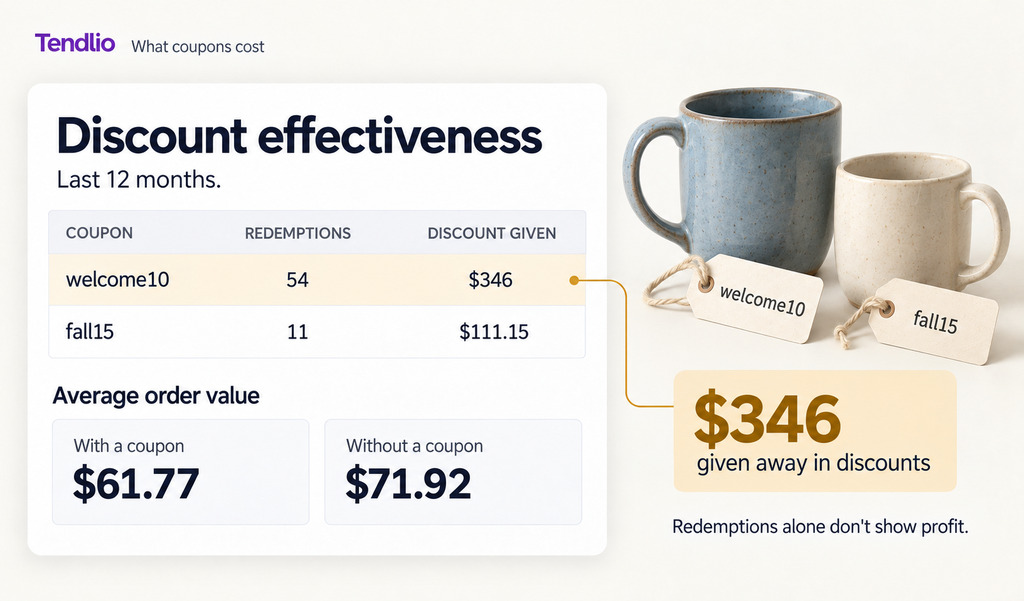
Every code on one page
The Discount effectiveness page (Reports → Discount report) shows:
- What you gave away, for question 1. The total given away in coupon discounts. The page separates discounts from your own codes from incentives Tendlio sent for cart recovery and customer recognition.
- Orders with and without coupons, a starting point for question 2. Their average order values side by side, so you can check whether customers who use a code place larger orders. Use the comparison to choose which always-on codes to pause, then watch what happens to sales during your test.
- A row for each coupon. Who sent it, redemptions, discount given, order revenue and average order value. The coupons with the biggest total discounts appear first, so you can begin with the codes costing you the most.
Alongside these figures, check your order list to answer question 3 about new and returning customers. When you send a code in a campaign, the Campaigns page suggests aiming it at the customers who have been gone longest, because customers who still buy may order without a code.
Sale prices get the same check
You can ask the same questions about sale prices. Tendlio compares units sold before and since a discount for products currently on sale, alongside the margin given up. Recent price drops also have before-and-after sales figures, helping you review whether the lower price was followed by more units sold.
Three mistakes Tendlio's own coupons avoid
- Tendlio's percentage coupons don't apply to sale items, which prevents an extra coupon discount on top of a markdown.
- Each Tendlio code works once and only for the email address it was sent to, so a code posted on a deal site doesn't work for anyone else.
- Tendlio's coupons expire, and Tendlio deletes the unused codes, so those codes don't stay available.
When you stop a coupon
You can offer shoppers another reason to buy:
- A free shipping threshold. Tendlio calculates a free shipping threshold using your average order value, shipping cost and margin, as our free shipping threshold guide explains.
- A free gift. Tendlio's Free gift option lets you offer a product you choose as a gift once the cart passes a minimum you set. A gift can help you clear stock using an approach covered in our dead stock guide, without handing out another shareable code.
Want every coupon's cost and order-value signal on one page, updated from your own orders? Start your free trial of Tendlio.
FAQ
What's a good coupon redemption rate?
Redemption rate alone isn't a useful target, because a high rate can mean profitable new customers or margin given away on orders you would have received anyway. Check how much margin the discounts cost and who used them.
Are percentage or fixed-amount coupons better?
Fixed amounts are easier to control, because you know the largest discount per order. A percentage grows with the cart total, so it costs you most on your biggest orders. If you use percentages, cap them or exclude sale items, so a coupon can't combine with a sale price and take the final price below cost.
What can I use instead of coupons?
A free shipping threshold, a bundle that pairs slow stock with a best-seller, or a free gift above a minimum cart total. Each option gives customers a reason to buy without a coupon code they can share, and a gift costs you what you paid for it.
How do I stop coupon abuse?
Use WooCommerce's coupon restrictions: usage limits per coupon and per user, an expiry date, a minimum spend, and product or category exclusions. A code that never expires and works for everyone can keep being shared outside the audience you intended.